Hello guyz. I have simple code here to change the background color of Listview and it's cells during runtime.
Step 1:
Create first a Listview.
Step 2:
Put this code at your form_load event.
listView1.Items.Add("Hello World");
listView1.Items[0].SubItems[0].BackColor = Color.Blue;
Friday, May 16, 2008

Wednesday, May 14, 2008
How to Clear all Text in a TextBox in C#
Im using C sharp 3.0
Try This Codes:
private void button1_Click(object sender, EventArgs e)
{
foreach(Control sayre in this.Controls)
{
if (sayre is TextBox)
{
(sayre as TextBox).Clear();
}
}
}
Try This Codes:
private void button1_Click(object sender, EventArgs e)
{
foreach(Control sayre in this.Controls)
{
if (sayre is TextBox)
{
(sayre as TextBox).Clear();
}
}
}
How to Get Date and Time Difference in C#
Hello guyz. I have example here on how to get the difference of date and time in C#.
private void dateTimePicker1_ValueChanged(object sender, EventArgs e)
{label1.Text = dtfrom.Value.ToString();}
private void timer1_Tick(object sender, EventArgs e)
{label2.Text = string.Format("{0:G}", DateTime.Now);}
private void button1_Click(object sender, EventArgs e)
{
TimeSpan ts = new TimeSpan();
DateTime dt1,dt2 = new DateTime();
dt1 = dtfrom.Value;
dt2 = Convert.ToDateTime(label2.Text);
ts=dt1.Subtract(dt2);
label3.Text = ts.ToString(); //Answer
}
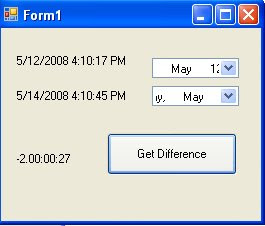
Step: 1
Create a timer then set the interval to 10 and enabled to true.
Create a timer then set the interval to 10 and enabled to true.
Step: 2
Create 3 Label. Label1,Label2,Label3.
Step: 3
Create 2 Datepicker. Name it dtfrom and dtto.
Step: 4
Create a Button1
Create a Button1
Then Copy this Code at your form:
private void dateTimePicker1_ValueChanged(object sender, EventArgs e)
{label1.Text = dtfrom.Value.ToString();}
private void timer1_Tick(object sender, EventArgs e)
{label2.Text = string.Format("{0:G}", DateTime.Now);}
private void button1_Click(object sender, EventArgs e)
{
TimeSpan ts = new TimeSpan();
DateTime dt1,dt2 = new DateTime();
dt1 = dtfrom.Value;
dt2 = Convert.ToDateTime(label2.Text);
ts=dt1.Subtract(dt2);
label3.Text = ts.ToString(); //Answer
}

Thursday, May 8, 2008
Different Date Format in C#
DateTime sai = DateTime.Now; //Get Date and Time
Console.WriteLine("d format: {0:d}", sai);
Console.WriteLine("D format: {0:D}", sai);
Console.WriteLine("D format: {0:D}", sai);
Console.WriteLine("t format: {0:t}", sai);
Console.WriteLine("T format: {0:T}", sai);
Console.WriteLine("f format: {0:f}", sai);
Console.WriteLine("F format: {0:F}", sai);
Console.WriteLine("g format: {0:g}", sai);
Console.WriteLine("G format: {0:G}", sai);
Console.WriteLine("m format: {0:m}", sai);
Console.WriteLine("M format: {0:M}", sai);
Console.WriteLine("r format: {0:r}", sai);
Console.WriteLine("R format: {0:R}", sai);
Console.WriteLine("s format: {0:s}", sai);
Console.WriteLine("u format: {0:u}", sai);
Console.WriteLine("U format: {0:U}", sai);
Console.WriteLine("y format: {0:y}", sai);
Console.WriteLine("Y format: {0:Y}", sai);
Console.Read();


Monday, April 28, 2008
Opening Single Window at MDI Form C#
Hello guys. This simple example codes will open a single window. I have 2 ways of opening a window in MDI Form in C#.
1) Creating a Instance in a Form
2) Just create a variable of a Form
Example 1:
-Create a MDI Form and a Form1.
*At you Form1 write this codes:
private static Form1 sForm = null;
public static Form1 Instance()
{
if (sForm == null)
{ sForm = new Form1 (); }
return sForm;
}
protected override void Dispose(bool disposing)
{
if (disposing && (components != null))
{
components.Dispose();
}
base.Dispose(disposing);
sForm = null;
}
*In the MDI Form button for showing a Form1 write this codes:
Form sForm = new Form1.Instance();
sForm.MdiParent=this;
sForm.show();
sForm.Activate();
Example 2:
-Create a MDI Form and a Form1.
*Write this codes at your MDI Form:
//Create a variable:
private Form1 frm1 = new Form1();
//Button showing a Form1:
frm1.MdiParent=this;
frm1.show();
I hope this 2 ways of example can help you for those dont known on how to open a single window at C#.
1) Creating a Instance in a Form
2) Just create a variable of a Form
Example 1:
-Create a MDI Form and a Form1.
*At you Form1 write this codes:
private static Form1 sForm = null;
public static Form1 Instance()
{
if (sForm == null)
{ sForm = new Form1 (); }
return sForm;
}
protected override void Dispose(bool disposing)
{
if (disposing && (components != null))
{
components.Dispose();
}
base.Dispose(disposing);
sForm = null;
}
*In the MDI Form button for showing a Form1 write this codes:
Form sForm = new Form1.Instance();
sForm.MdiParent=this;
sForm.show();
sForm.Activate();
Example 2:
-Create a MDI Form and a Form1.
*Write this codes at your MDI Form:
//Create a variable:
private Form1 frm1 = new Form1();
//Button showing a Form1:
frm1.MdiParent=this;
frm1.show();
I hope this 2 ways of example can help you for those dont known on how to open a single window at C#.
Thursday, April 10, 2008
How to Pass values to another Form
Ok. Lets say you have 2 Forms. Form1 and Form2.
In Visual Basic 6 this is simple codes with 1 line only: Form2.text1.text = Form1.text1.text
Thats so Simple.
But in C# not 1 line code. I have 2 ways to get a text from Form1/Form2.
FIRST WAY:
1.) Goto Form1 then Double Click it. At the code type this.
public string CaptionText
{get {return textBox1.Text;}
set { textBox1.Text = value; }}
note: the value of your textbox1.text = sayre;
2.) Goto Form2 then Double click it. At the code type this.
// At your command button In Form2
private void button1_Click(object sender, EventArgs e)
{
Form1 sForm1 = new Form1();
textBox1.Text = sForm1.CaptionText;
}
SECOND WAY:
1.) Goto Form2 then Double click it. At the code type this.
public Form2(string sTEXT)
{
InitializeComponent();
textBox1.Text = sTEXT;
}
2.) Goto Form1 then Double click it. At the code type this.
//At your command button in Form1
private void button1_Click(object sender, EventArgs e)
{
Form2 sForm = new Form2(textBox1.Text);
sForm.Show();
}
In Visual Basic 6 this is simple codes with 1 line only: Form2.text1.text = Form1.text1.text
Thats so Simple.
But in C# not 1 line code. I have 2 ways to get a text from Form1/Form2.
FIRST WAY:
1.) Goto Form1 then Double Click it. At the code type this.
public string CaptionText
{get {return textBox1.Text;}
set { textBox1.Text = value; }}
note: the value of your textbox1.text = sayre;
2.) Goto Form2 then Double click it. At the code type this.
// At your command button In Form2
private void button1_Click(object sender, EventArgs e)
{
Form1 sForm1 = new Form1();
textBox1.Text = sForm1.CaptionText;
}
SECOND WAY:
1.) Goto Form2 then Double click it. At the code type this.
public Form2(string sTEXT)
{
InitializeComponent();
textBox1.Text = sTEXT;
}
2.) Goto Form1 then Double click it. At the code type this.
//At your command button in Form1
private void button1_Click(object sender, EventArgs e)
{
Form2 sForm = new Form2(textBox1.Text);
sForm.Show();
}
Subscribe to:
Posts (Atom)
