Showing posts with label C#. Show all posts

Monday, August 30, 2010

FaceBook Blocked

Hi Guys,

Is your facebook website blocked? Try to download the file thru this link FACEBOOK Browser . This is only a demo and need to enhance. Any Comments and Suggestion are welcome.

Thanks.

Thursday, August 28, 2008

Check Item in listview if exist

Hello guys.

This sample code will show on how to check if the item in the listview is already existing.

// create a bool
bool found = false;

foreach (ListViewItem LVI1 in listView1.Items)
{
if (LVI1.Text == textBox1.Text)
{ found = true; }
}

if (!found)
{
ListViewItem LVI = new ListViewItem(textBox1.Text, 0);
LVI.SubItems.Add(textBox2.Text);
LVI.SubItems.Add(textBox3.Text);
listView1.Items.Add(LVI);
}
else
{ MessageBox.Show("Found " + textBox1.Text ); }

Wednesday, May 14, 2008

How to Clear all Text in a TextBox in C#

Im using C sharp 3.0

Try This Codes:


private void button1_Click(object sender, EventArgs e)
{
foreach(Control sayre in this.Controls)
{
if (sayre is TextBox)
{
(sayre as TextBox).Clear();
}
}
}

How to Get Date and Time Difference in C#

Hello guyz. I have example here on how to get the difference of date and time in C#.

Step: 1
Create a timer then set the interval to 10 and enabled to true.

Step: 2
Create 3 Label. Label1,Label2,Label3.

Step: 3
Create 2 Datepicker. Name it dtfrom and dtto.

Step: 4
Create a Button1

Then Copy this Code at your form:

private void dateTimePicker1_ValueChanged(object sender, EventArgs e)
{label1.Text = dtfrom.Value.ToString();}
private void timer1_Tick(object sender, EventArgs e)
{label2.Text = string.Format("{0:G}", DateTime.Now);}
private void button1_Click(object sender, EventArgs e)
{
TimeSpan ts = new TimeSpan();
DateTime dt1,dt2 = new DateTime();
dt1 = dtfrom.Value;
dt2 = Convert.ToDateTime(label2.Text);
ts=dt1.Subtract(dt2);
label3.Text = ts.ToString(); //Answer
}


Thursday, May 8, 2008

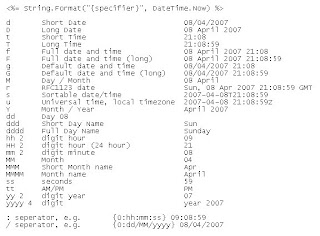
Different Date Format in C#

DateTime sai = DateTime.Now; //Get Date and Time


Console.WriteLine("d format: {0:d}", sai);
Console.WriteLine("D format: {0:D}", sai);

Console.WriteLine("t format: {0:t}", sai);

Console.WriteLine("T format: {0:T}", sai);

Console.WriteLine("f format: {0:f}", sai);

Console.WriteLine("F format: {0:F}", sai);

Console.WriteLine("g format: {0:g}", sai);

Console.WriteLine("G format: {0:G}", sai);

Console.WriteLine("m format: {0:m}", sai);

Console.WriteLine("M format: {0:M}", sai);

Console.WriteLine("r format: {0:r}", sai);

Console.WriteLine("R format: {0:R}", sai);

Console.WriteLine("s format: {0:s}", sai);

Console.WriteLine("u format: {0:u}", sai);

Console.WriteLine("U format: {0:U}", sai);

Console.WriteLine("y format: {0:y}", sai);

Console.WriteLine("Y format: {0:Y}", sai);

Console.Read();


Monday, April 28, 2008

Opening Single Window at MDI Form C#

Hello guys. This simple example codes will open a single window. I have 2 ways of opening a window in MDI Form in C#.

1) Creating a Instance in a Form
2) Just create a variable of a Form


Example 1:

-Create a MDI Form and a Form1.

*At you Form1 write this codes:

private static Form1 sForm = null;
public static Form1 Instance()
{
if (sForm == null)
{ sForm = new Form1 (); }
return sForm;
}

protected override void Dispose(bool disposing)
{
if (disposing && (components != null))
{
components.Dispose();
}
base.Dispose(disposing);
sForm = null;
}

*In the MDI Form button for showing a Form1 write this codes:

Form sForm = new Form1.Instance();
sForm.MdiParent=this;
sForm.show();
sForm.Activate();


Example 2:

-Create a MDI Form and a Form1.

*Write this codes at your MDI Form:

//Create a variable:
private Form1 frm1 = new Form1();
//Button showing a Form1:
frm1.MdiParent=this;
frm1.show();


I hope this 2 ways of example can help you for those dont known on how to open a single window at C#.